An Indie Author’s Social Media Primer | Summary Edition

Well, it’s been quite a project, this social media primer of ours!  I hope it’s proven as useful to you, our readers, as it has been enjoyable for me to write!  I thought I’d take a couple of minutes to take a lingering glance in the rear-view mirror, and write a bit of a retrospective on what it means to carry out a social media marketing campaign–and how a primer fits in.

We’re here,” I wrote in that initial blog post, first and foremost, to talk about how to market your self-published book.”  And therein lies both the value and danger of social media as a marketing tool.  If you really are using social media effectively, as a natural and organic extension of your existing work and personality, then you’ll most definitely benefit, and your book sales will most definitely benefit as well.  If you approach social media as an all-purpose tool and the only tool you need in your toolbox–or if you present yourself falsely, inauthentically, or otherwise find yourself at odds with your fans–or if you bite off more than you can chew–or if you find yourself slipping into social media as just another time-waster–then you’re missing the point of being an author on social media.  These are the pitfalls, or at least a few of them, and they should not be taken lightly or underestimated.

social media

Here’s the trick to being a self-published author on social media:  You must always remember that you are, first and foremost, a writer.  And as we’ve said before here on Self Publishing Advisor, the absolute best decision you can ever make in marketing your book is to write another book.  If social media helps you spread the word, and helps you keep writing, then it has a place in your campaign.  If it distracts you, or distresses you, or eats into time you would otherwise spend writing, then you should revisit the expression “effective marketing.”  There is, however, a great deal of value to trying something new, especially when you hit a roadblock.  It is my hope that, by providing a primer guide to each of the major (and some of the minor) social media platforms, I may take some of the guesswork and fear out of launching yourself into the world of social media.  Maybe, just maybe, you’ll be able to bypass some of the misery and second-guessing and mistakes that I myself have made over the years–and find a new home, a new community, and an engaged readership in some unexplored corner of our digital universe.

The List:

  1. First Thoughts
  2. Twitter
  3. Tumblr
  4. Instagram
  5. Snapchat
  6. YouTube
  7. Pinterest
  8. Goodreads
  9. Etsy
  10. LinkedIn
  11. Flickr
  12. Facebook

Thank you for helping me build this Social Media Primer!  If you have any questions, comments, suggestions, or contributions, please use the comment field below or drop us a line at selfpublishingadvice@gmail.com.  And remember to check back each Wednesday for your weekly dose of marketing musings. ♠

KellyABOUT KELLY SCHUKNECHT: Kelly Schuknecht is the Executive Vice President of Outskirts Press. In addition to her contributions to the Outskirts Press blog at blog.outskirtspress.com, Kelly and a group of talented marketing experts offer book marketing services, support, and products to not only published Outskirts Press authors, but to all authors and professionals who are interested in marketing their books and/or careers. Learn more about Kelly on her blog, kellyschuknecht.com.

An Indie Author’s Social Media Primer | Facebook

It should come as no surprise that we’re going to take a quick look at Facebook as we work our way down the list of social media platforms the digitally-savvy indie or self-published author should consider using when launching a comprehensive self-promotion campaign.  And it probably is similarly unsurprising that we’ve looked at Facebook beforeseveral timesso many times–and that we’re just one blog among many to have done so.

Facebook

There are, in fact, so many resources out there about how indie authors can make use of Facebook, that the greater challenge is not in finding information–in contrast to, say, my posts about Etsy and Snapchat and so on–but in discerning which information is actually useful!  To that end, I’ve compiled and curated some of the better (and more well-maintained, that is, up-to-date) resources below for your easy review, as opposed to listing our own “best practices.”  My hope is that you’ll find all the appropriate details you might need at your disposal in order to navigate the intricacies of the complex proposition that is Facebook.

Debunking the Great Facebook Myth: “It’s just one giant moving target–there’s no point to trying to master anything about Facebook, because it’s just going to change again in a few months!”

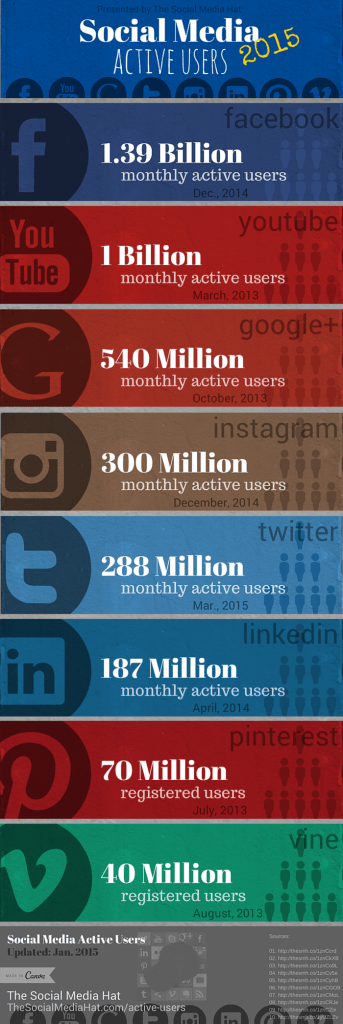
While Facebook’s developers are constantly tweaking the algorithms and codes and format of things (it’s true, we must admit), the website itself remains fairly stable in a number of ways.  First of all, the fact remains true that Facebook is where the people are–the people, the relationships, the possible connections, and the real market for your books.  Consider this infographic, courtesy of Rebekah Radice:

Social-Media-Active-Users

The people are staying put, and sticking by Facebook, despite the not-uncommon doomsday forecasts to the contrary.  But that’s not the only aspect of Facebook that is stable: the features may alter a bit in form and function, but the concept of what you’re using those features for remains the same.  I’ve written a great deal throughout this series of primers about social media marketing targeting certain specific pillars of the online experience: findability, adaptability, usability, and authenticity.  If any of these four aspects is missing from an author’s social media presence, they’re bound to suffer.  If, however, you are conscientious in maximizing your Facebook presence, as these resources should help you to do, then you’re practically guaranteed to grow your reading audience.

Top 5 Best Resources:

1. “The Power of Facebook for Authors” by David Henry Sterry over at The Author Online.

2. “30 Ways to Build Your Fanbase with Facebook” by the folks over at Duolit.

3. “My Experiments with Facebook Ads” by Rami Ungar over at Self-Published Authors Helping Other Authors.

4. “Facebook Ads: Should Indie Authors Buy Them?” by Joel Friedlander over at The Book Designer.

5. “7 Essential Elements for an Author’s Facebook Page” by Antonella Iannarino over at the David Black Agency’s official blog.

And a bonus additional resource:

The tag archive for “Facebook” over at ALLi‘s “How-to For Authors” blog.

Please keep us posted of your own successes as you experiment with new platforms.  You’re our most inspiring innovators, and the internet is your laboratory.  We can’t wait to see what you do!  And make sure to check back next week, as I wrap up this social media primer with the all-important summary edition!

If you have any questions, comments, suggestions, or contributions, please use the comment field below or drop us a line at selfpublishingadvice@gmail.com.  And remember to check back each Wednesday for your weekly dose of social media know-how. ♠

KellyABOUT KELLY SCHUKNECHT: Kelly Schuknecht is the Executive Vice President of Outskirts Press. In addition to her contributions to the Outskirts Press blog at blog.outskirtspress.com, Kelly and a group of talented marketing experts offer book marketing services, support, and products to not only published Outskirts Press authors, but to all authors and professionals who are interested in marketing their books and/or careers. Learn more about Kelly on her blog, kellyschuknecht.com.

An Indie Author’s Social Media Primer | Flickr

Remember when I wrote a primer for indie and self-published authors looking to make their debuts on Instagram?  Well, I’m back this week with a new primer geared towards those of a visual bent.  But instead of looking at one of the Big Five (Facebook, Twitter, Tumblr, Pinterest, and Instagram), I’m going to take a quick gander at one of the less talked-about tools in the indie author’s toolbox: Flickr!

flickr

There are, of course, several key differences between Instagram and Flickr.  If you’ll remember, the top 5 “best practices” I recommended for Instagram users were to (1) “Go for the gut;” (2) “Think regular, but not too regular;” (3) “You’re in the inspiration business, so share yours;” (4) “Use the hashtags and @username functions;” and last but not least, (5) “Don’t posture.”  While intuition, inspiration, reliability, authenticity, and metadata remain important when you make the leap to Flickr, the platform is so different that their manifestations must also be.  In fact, I’d suggest we rethink what makes a Flickr image “social” altogether.

Debunking the Great Flickr Myth: “It’s just a place to store photos.”

While it certainly is a place to store photos, Flickr isn’t just a high school locker we pack full to overflowing.  Other visually-oriented social media websites like Instagram or Pinterest “capture” their users by making it easy to interact with photos and share items within the platform itself, and while you can certainly share links to Instagram and Pinterest content, the format of said sharing creates a hit-or-miss prospect when it comes to non-users viewing your material.  That is, someone may choose to follow a link … or they may not.  You may also end up with duplicates of all of your pictures if you have Instagram set to upload photos directly to dedicated Facebook albums.  Not ideal, right?

A lot of people think Flickr is just another cloud storage option, like Dropbox, only complicated by the fact that you can also comment on and interact with the photos on Flickr itself.  Is it trying to be a social media platform, or cloud storage, or what?  When you approach Flickr with the expectation that it will look and feel and function like either Pinterest or Google’s outmoded Picasa Web Album system, you’re bound to get bogged down in a messy and unintuitive tangle of groups and discussion boards and so on.

It’s so much better just to skip all of that chaos and focus on what Flickr does really well, and what it can specifically do for you, an indie or self-published author.

Top 5 Best Practices:

1. Embed, embed, embed.  One of Flickr’s absolute best features is its embedability.  What do I mean by this?  I mean you can copy either a hyperlink for an individual photograph, or a hyperlink for an entire slideshow, and integrate this code into your blog or website to display continually there.  Why is this useful?  First off, you can create either one-off blog posts which feature beautiful high-resolution images (a Flickr specialty)––as The Daily Beast’s Nicole Villeneuve has done in her “Moveable Feast” article––or you can create a slideshow as a permanent feature of your website, as the University of Michigan’s School of Public Health demonstrates here.  While other social media platforms may enable you to interact with your friends’ photographs within the contained environment of their networks, Flickr fills in the gaps by breaking your images out into any web forum imaginable.

2. Ramp up the quality.  Instagram’s strength is that it relies upon timeliness, and a certain “in the moment” quality that brings immediacy and spontaneity to the table.  Flickr, on the other hand, allows its users to upload truly high-quality photographs with minimal compression and data loss (comparatively, at least).  Other social media platforms capitalize on users’ general satisfaction in simply sharing an image, no matter what quality that image is, quickly and easily.  But Facebook compresses all images by as much as 80 percent, which results in a great deal of fuzz and blur.  Flickr displays images at full resolution, making for giant and gorgeous incarnations of your photos in well-curated, smoothly synced pages.  It isn’t just a place where “hip” amateurs upload happy snaps; it’s a digital home for serious photographers.  Take advantage of both Flickr’s 1 terabyte of free storage and its cachet!

3. Think like a designer.  Perhaps this one’s a little … unconventional, but Elite Truong recently wrote a lovely article for Poynter that provides a lot of great pointers on how authors can learn a little from their more visually-inclined fellow artists––and I’m feeling inspired.  Think of Flickr as a medium, just as you do the white page of your word processor (or the physical paper of your notebook!).  How can you build narratives with images that reflect or complement the narrative you’ve already shaped into a book?  You don’t have to become a watercolorist or a professional photographer overnight––but, but––you can definitely steal a hand from their playbook when it comes to connecting with new audiences or better connecting with existing ones.

4. Cross-link your description fields.  As with any other website, Flickr is rich in possibility when it comes to metadata.  You can tag and even geotag your images, add titles and descriptions, and direct viewers to click on hyperlinks that lead back to your personal website.  You can create thematic sets, albums, and slideshows; each new collection that you curate generates its own wave of metadata, which renders you more findable.  There’s so much metadata on Flickr, in fact, that sometimes it can be a struggle to decide just where to begin.  The description field?  Definitely.  The title?  Oh, yes.  You can even tweak some of the camera settings (like aperture and focal length) that are displayed alongside your images.

5. Think “Portfolio” rather than “Scrapbook.”  This is not to say that scrapbooks aren’t awesome.  They are.  They simply aren’t a one-size-fits-all tool for every situation.  Sometimes, you need a beautifully-built, professionally-presented, visually stunning home for your images.  And whether you, as an author, are posting behind-the-scenes pictures of your writing space, or perhaps high-resolution illustrations of certain pages of your upcoming children’s book, or even art prints of certain favorite quotes from your works, there’s no better way to get new readers to do a double take than with a Flickr slideshow.  A handy rule of thumb might be: If a picture is something you simply want to share, then Instagram or Facebook may be well and good; if it’s something you want to sell, then Flickr will showcase your product to maximum visual impact.

Most Overlooked Feature:

Let’s face it, Flickr as a whole is an overlooked feature.  Sure, it may be making a bit of a comeback since its makeover at the hands of former Yahoo! executive Marissa Mayer, but it’s still not the first social media platform that authors think of when they’re looking to branch out into something new.  And as I mentioned before, there are some ways in which it converses easily with other platforms––there are groups, discussion boards, metadata fields, and profile pages to fill out––and ways in which it stands out.

When push comes to shove, Flickr is not a substitute for any of the Big Five, simply because its many users don’t quite amount to the critical mass of millions or even billions that the upper crust of social media websites has locked in.  Its specialized tools are, however, an asset and a credit to a much-needed niche if you happen to be looking for something a little … glossier … than Instagram.

I hope you’ll join me in building this Social Media Primer!  If you have any questions, comments, suggestions, or contributions, please use the comment field below or drop us a line at selfpublishingadvice@gmail.com.  And remember to check back each Wednesday for your weekly dose of social media know-how. ♠

KellyABOUT KELLY SCHUKNECHT: Kelly Schuknecht is the Executive Vice President of Outskirts Press. In addition to her contributions to the Outskirts Press blog at blog.outskirtspress.com, Kelly and a group of talented marketing experts offer book marketing services, support, and products to not only published Outskirts Press authors, but to all authors and professionals who are interested in marketing their books and/or careers. Learn more about Kelly on her blog, kellyschuknecht.com.

An Indie Author’s Social Media Primer |LinkedIn

If you’re not already a member of LinkedIn, perhaps you’re familiar with the following scenario: you wake up on a lovely Monday morning, high-tail it in to work with only minutes to spare before your shift at the factory plant or in the cubicle farm or out at the library begins; you pull up Microsoft Outlook to check your email and set up your day’s schedule, only to find … thirteen emails from friends who want to “add” you to their “professional network on LinkedIn”?  What in blazes does that mean?  Is it a scam or something?

linkedin email

No, it’s not a scam–I promise!  The emails are just an incredibly weird side effect and the only negative feature I know of to setting up a LinkedIn account.  (When new LinkedIn users have the chance to add friends to their network, the website mines their email contacts to generate networking possibilities, and doesn’t visually make it clear which of the folks you click on to connect with already have accounts and which ones do not).  So while the emails may clutter up your inbox, they’re not meant to be malicious–either on the part of LinkedIn, or the friends who send them.

linkedin

All this begs the question: What exactly is LinkedIn, and how can a self-published or self-publishing author best make use of the platform?  This social networking website touts itself as “The World’s Largest Professional Network,” is run by CEO Jeff Weiner (of Yahoo! fame) and a board chaired by founder Reid Hoffman (of PayPal and SocialNet.com fame) with the purported goal of connecting users interested in more career-driven networking than is made possible by, say, Facebook and Instagram.  It seems to be doing a fairly good job of achieving this end, as its approximately 364-million-strong user base can attest.  Any self-published author looking for a new weapon in his or her repertoire should definitely keep LinkedIn at the top of the shortlist!

Debunking the Great LinkedIn Myth: “It’s all work, and no play.”

LinkedIn certainly attracts a different user base from, say, Snapchat–but that doesn’t mean its users aren’t making full use of the platform’s more “social” aspects for recreation and enjoyment.  And as this article on the Daily Dot points out, industry professionals are being led into blogging and socializing by the platform–book lovers and self-publishing author’s don’t have to fight or struggle to carve out a niche … it already exists.  Users log in to LinkedIn, on average, less frequently than the average Facebook user (according to Mashable in 2013, the average Facebooker checked the app 15 times a day).  But engagement on LinkedIn is, contrary to some folks expectations, extraordinarily high.  This may be because LinkedIn is a destination website, a place to go rather than a place to go through to get somewhere else or to burn some free time.  Users see LinkedIn as a tool, and they’re more likely to actually read the blog posts (for example) that they see on there than ones they might stumble across elsewhere.

But what is a self-published author to do?  Setting up a LinkedIn profile will benefit anyone, but what are some ways that an author can make special use of the platform?

Top 5 Best Practices:

1. Groups, groups groups.  Other social media platforms have group discussion boards–last week, for example, I specifically pointed out Etsy’s group features–but not all groups are created equal.  What may seem perfunctory or underdeveloped or a programming afterthought elsewhere has been brought close to perfection on LinkedIn.  You can tell that group memberships and discussions were a priority of the website’s developers, as the interface is clean and smooth and easy to interact with.  You can find or create groups, manage groups, join groups, and participate in groups you’re interested in without worrying about the content being dumped straight into indexing search engines for everyone running a Google search to see–LinkedIn’s algorithm is much more picky in what it offloads than, say, Goodreads’.  You can customize the privacy settings of the groups you manage, rendering some public and free to join, and others private or invitation only.  And all that I said above about user engagement being high on LinkedIn?  There’s no better place to see this engagement lived out in the round than in LinkedIn’s many active groups.  So: join a few!  Start a few discussions!

2. Keep tabs on the “Topics” page.  A simple search shows a beautifully put-together page in the Topics section of LinkedIn dedicated to none other than the subject of self-publishing.  These Topics pages serves as a kind of constantly-updated newsletter of everything posted to the website–articles, blog posts, groups discussions, presentations, companies, and industry trends–that relates.  You can find what characteristics or “skills” LinkedIn users engaged in self-publishing share (“Creative Writing” and “Editing” the top two–no surprise there!), or you can access a slideshow on “How to Write a Book in 10 Days” … just to provide two examples among many.  Don’t underestimate LinkedIn’s Topics!

3. Make it your first stop on the research train.  Are you looking to self-publish and you haven’t decided what company best represents your interests?  Many indie, hybrid, and self-publishing companies keep active LinkedIn pages, and you can take full advantage of this by connecting with the company itself or any of its employees who also have LinkedIn profiles.  Outskirts Press is a great example of a hybrid publishing company with a rich LinkedIn presence–many of its authors, author representatives, and executives are present there.  You can do your due diligence with ease, just by perusing a company’s profile and exploring the information presented there.  Want to know if you can trust a company to provide the best quality print on demand books for you?  Want to find agents, editors, or other collaborators?  Check LinkedIn.

4. Boost your credibility.  As I’ve mentioned already, LinkedIn attracts users who are highly engaged but who are also looking specifically to build business-oriented networks.  Accounts are reviewed by LinkedIn staff to verify that users are not using fake or ridiculous names, which is just one layer of the self-reinforcing professionalism that makes LinkedIn special.  If you want to create a brand around your name as a self-published author, there’s literally no better place to get started.  Creating a polished LinkedIn profile that takes full advantage of the metadata and the form available (enter as much information as possible to make yourself as findable as possible!) will allow you to feel confident that a publisher or agent who Googles your name comes up with something that confirms your reliability, credibility, and professionalism.  There’s not much more you can do to help yourself stand out from the pack!

5. Use the Pulse.  Just over a year ago, LinkedIn opened up its “Pulse” blogging platform to all users–a privilege that had previously been reserved for about 500 key “Influencers.”  Perhaps because it began with such constraints, Pulse retains some of its aura as a voice for the truly expert, and it’s a beautiful illustration of how a blog can indeed be seamlessly wound up with a social network.  Pulse offers all or most of the features you might find on a blog platform like WordPress, with great customizability and the option to include hyperlinked text.  Posts on Pulse automatically display as both a part of your user profile and your connections’ home page feeds.  They show up in search engine results, too.  The best part about Pulse is that you don’t have to use it as a blog if you don’t want to–you can use it as a secondary publishing platform.  Because Pulse allows for beautiful long-form posts, you could feasibly offer whole chapters or even an entire book (in chapters) for your connections to read!

Most Overlooked Feature:

The “Projects” section of your LinkedIn profile is an excellent–and under-utilized!–feature that you should definitely take a second look at.  Why?  Because it’s not just a spot to list ongoing works in progress … it’s a fully linkable and functional tool.  You can connect a project to an Amazon book listing, an author webpage, and to its actual editorial or publishing team!  I mean, how neat.

linkedin projects

Best of all, the projects section is a dedicated space, which means that the information you input there won’t get shuffled off of your profile page or lost in the aether.  Unless you choose to remove it, a book you list as a project becomes a permanent feature of both your page and the page of any other collaborators who confirm their connection to it!

I hope you’ll join me in building this Social Media Primer!  If you have any questions, comments, suggestions, or contributions, please use the comment field below or drop us a line at selfpublishingadvice@gmail.com.  And remember to check back each Wednesday for your weekly dose of social media know-how. ♠

KellyABOUT KELLY SCHUKNECHT: Kelly Schuknecht is the Executive Vice President of Outskirts Press. In addition to her contributions to the Outskirts Press blog at blog.outskirtspress.com, Kelly and a group of talented marketing experts offer book marketing services, support, and products to not only published Outskirts Press authors, but to all authors and professionals who are interested in marketing their books and/or careers. Learn more about Kelly on her blog, kellyschuknecht.com.

An Indie Author’s Social Media Primer | Pinterest

We’re not the first to write about the ways in which you can use Pinterest to help market your book, and we won’t be the last.  Why?  Because books are first and foremost a tangible object with incredible visual (and tactile) appeal, and Pinterest is a social media platform designed and built to showcase beautiful things.  Emphasis on “things.”  Pinterest is often described as a kind of digital bulletin board, and whether or not you actually use bulletin boards in real life, it is a powerful tool for collecting objects–most of them real and actual physical objects–together into one easy-to-access-and-modify place.  It may not have been specifically designed for books, but Pinterest is definitely a book-lover’s dream … and a haven, too, for self-published authors.

Pinterest

How does Pinterest work?  Users create profiles, find and follow their friends, and have the freedom to tag these friends when “pinning,” not to mention respond to or “re-pin” these friends’ “pins.”  You can create just one Pinterest “board,” or many.  You can even determine which ones are public and which ones are private, and invite your friends to pin to your private boards with you!  (As with every other social media platform, Pinterest has created its own semi-exclusive vocabulary.)  Depending on whether you’re using the mobile interface on your smartphones or other smart devices, or whether you’re using the desktop interface on your computer or laptop, these pins are displayed tiled across your screen in a visual “feed.”  So far, you’ll note that Pinterest provides many of the same services as any other platform–like Tumblr, Facebook, and Twitter–only with a more visual twist.  In fact, I would say that Pinterest resonates with Instagram the most, since both of these mediums were designed exclusively to showcase visual content, and as such have attracted users of a more artistic bent.

So, how does the indie, hybrid, or self-published author take advantage of Pinterest?  First, we have to address a certain … stigma … that Pinterest has acquired.

Debunking the Great Pinterest Myth: “Isn’t it mostly just recipes and wedding ideas?”

Forbes has published an article on it.  So has the London School of Economics.  And a whole host of marketing professionals (such as SiteLogicMarketing).  In the United States, yes, some 83% of Pinterest users were female–but in the UK?  That number drops to 44% female.  And even in the predominantly female American user base, many big brands are making use of Pinterest to market meaningfully to men.  In her Forbes article, Michelle Greenwald writes that Pinterest’s emphasis on “lifestyle” makes it prime territory for companies to “[add] brand value and [communicate] all the ways the brand can fit into its customers’ lives.”  Yes, wedding companies and Etsy entrepreneurs and watercolorists have a good handle on the marketing potential of Pinterest, but so too do companies like Bit9, Go Pro, ESPN, IBM, and GE.  When push comes to shove, purchasing a new washing machine or scoping out a new piece of tech is just as much a lifestyle-building decision as collecting ideas for bridal bouquets.

Top 5 Best Practices:

1. Take advantage of your own cover art.  Your book is beautiful.  Own it!  Throwing together a Pinterest board that features your own book’s cover art should be amongst the first things you do with Pinterest as an author; the existing visual impact of your book is simply too great a resource to waste!  You can fill the board up with illustrated quotations from your book, or perhaps photographs of your book in various locations–out “in the field, in its natural habitat” so to speak.  And don’t forget about your book trailer, if you have one!

2. Put together an “inspiration board.”  What inspires you when you’re writing?  Art?  Music?  A really well-executed NPR interview?  Set the mood for both you and your readers by putting together an inspiration board that features images, sounds, and atmospheres that evoke the world you’ve created within the pages of your book.  You know those playlists that authors will put together to go with their books?  An inspiration board is kind of like a playlist, only the content can be much more varied (and usually, much more visual!).

3. Pin contests and giveaways.  There are all kinds of giveaways, contests, and sweepstakes running on Pinterest at any given moment, but often the most exciting ones involve books!  Consider offering ARCs (Advance Reading Copies), singly or in bundles, to your readers via a Pinterest contest–and to enter, perhaps challenge each contestant to pin a picture of themselves holding your book in their favorite reading nook or space.  This kind of contest turns into loads of free marketing for you, in part because it requires creative thinking and engagement on the part of your readers, and in part because for every person who enters and pins a picture, dozens more of their friends and family will be exposed to your book as it crops up in their Pinterest feeds.  Just be sure you know how to navigate the fair use guidelines and contest requirements as stated by Pinterest!

4. Never underestimate the power of similarity.  Those “if you like this, why don’t you try this?” ads are on to something, and Pinterest-savvy authors are taking note.  One of the best things you can do on Pinterest is to dedicate a board to books that resonate with yours.  Pin books (or book covers, with their Amazon listings linked in the descriptions, to be more specific) of the same genre, or featuring characters you like, or that employ plot devices that somehow exist in conversation with those you use.  What purpose does this serve?  As with any social media platform, you have to do a little creative manipulation to make yourself “findable” by your ideal readers.  The more links you generate, the more connections you make easily accessible, the more people will find you and follow you on Pinterest.  And don’t be afraid to “send” pins to or otherwise get in contact with other pinners whose interests resonate with your own; the worst thing someone can say is “no, I’m not interested in featuring your pin on my board of recently self-published historical fiction novels” … but they might be eager to pin it!  You won’t know until you ask.

5. Don’t be afraid to set up or convert to a “Business” account.  That’s right, Pinterest is doing its best to make it easy for you to build your brand!  There are certain advantages to using a Business Profile as opposed to a Personal Profile, including access to analytics and other platform-specific tools that help you track what pinning activities are proving successful, and how to focus your time, energy, and attention where it’s going to do the most good.

Most Overlooked Feature:

If you haven’t heard of your “source page,” then you’re missing out!  Pinterest sends out notifications when users re-pin your pins, but often these notifications don’t actually tell you how many users are pinning directly from your page and how many are re-pinning from other peoples’ feeds or from Pinterest’s built-in “suggestion” algorithms.  Your source page is pinterest.com/yoursite.com, so if your username was “selfpublishingchampion,” your source page would be pinterest.com/selfpublishingchampion.com.  Hop on over to your source page to see which pins are or are not performing well on Pinterest–it’s a good sign if users are pinning directly from your site, since that means they’re more likely to have seen more than just the one pin; they will have seen more of the content surrounding your book!

I hope you’ll join me in building this Social Media Primer!  If you have any questions, comments, suggestions, or contributions, please use the comment field below or drop us a line at selfpublishingadvice@gmail.com.  And remember to check back each Wednesday for your weekly dose of social media know-how. ♠

KellyABOUT KELLY SCHUKNECHT: Kelly Schuknecht is the Executive Vice President of Outskirts Press. In addition to her contributions to the Outskirts Press blog at blog.outskirtspress.com, Kelly and a group of talented marketing experts offer book marketing services, support, and products to not only published Outskirts Press authors, but to all authors and professionals who are interested in marketing their books and/or careers. Learn more about Kelly on her blog, kellyschuknecht.com.